

.png?width=120)
















Published: 16 October 2013
Category: Practical Guides
Shopping Cart
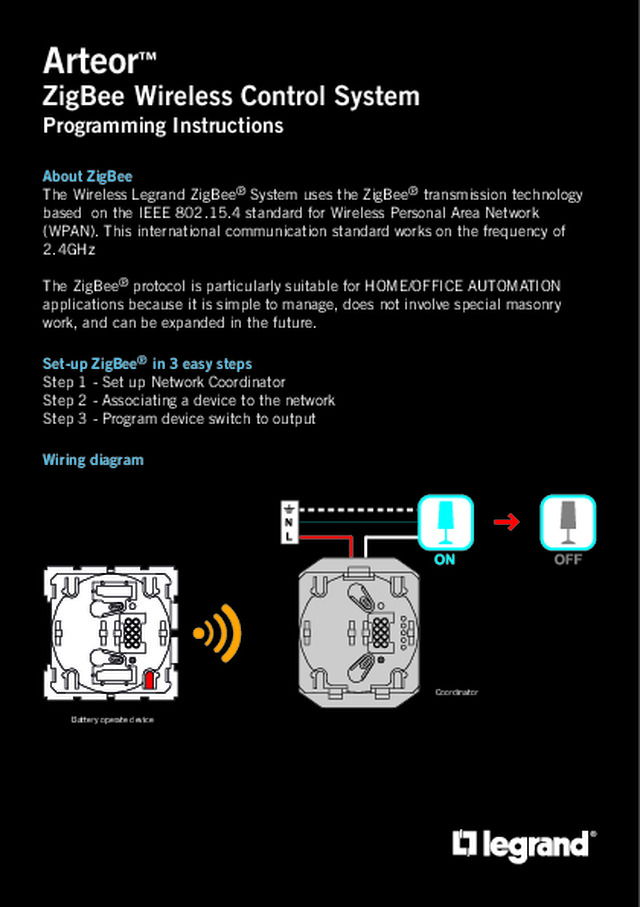
Legrand Arteor ZigBee Wireless Switch Control Instructions
The Wireless Legrand ZigBee® System uses the ZigBee® transmission technology based on the IEEE 802.15.4 standard for Wireless Personal Area Network (WPAN). This international communication standard works on the frequency of 2.4GHz.
The ZigBee® protocol is particularly suitable for HOME/OFFICE AUTOMATION applications because it is simple to manage, does not involve special masonry work, and can be expanded in the future.
Legrand
Legrand Arteor ZigBee Wireless Switch Control Instructions
Published: 16 October 2013 · Category: Practical Guides
The Wireless Legrand ZigBee® System uses the ZigBee® transmission technology based on the IEEE 802.15.4 standard for Wireless Personal Area Network (WPAN). This international communication standard works on the frequency of 2.4GHz.
The ZigBee® protocol is particularly suitable for HOME/OFFICE AUTOMATION applications because it is simple to manage, does not involve special masonry work, and can be expanded in the future.
From this document
Arteor™ ZigBee Wireless Control System Programming Instructions About ZigBee The Wireless Legrand ZigBee® System uses the ZigBee® transmission technology based on the IEEE 802.15.4 standard for Wireless Personal Area Network (WPAN). This international communication standard works on the frequency of 2.4GHz The ZigBee® protocol is particularly suitable for HOME/OFFICE AUTOMATION applications because it is simple to manage, does not involve special masonry work, and can be expanded in the future. Set-up ZigBee® in 3 easy steps Step 1 - Set up Network Coordinator Step 2 - Associating a device to the network Step 3 - Program device switch to output Wiring diagram Coordinator Battery operate device Step 1 - Network creation Creating the Network lets all the devices belonging to the Network receive and transmit control commands. Before describing the procedure to create the network here’s a legend of the symbols used as LED status. OFF ON STEADY SLOW FLASHING 1s 1s 1s QUICK FLASHING 1s Constant flash. Once a second. Constant flash. Twice a second. FLASHING MODE 3 PULSE/3 s 2s 1 Remove the keys or touch plates of the devices involved. 1s 3 flashes in one second and off for 2 seconds. 3 The NETWORK LED (yellow) shines steadily during the network search, then changes to quick flashing. OR Coordinator 2 Identify the coordinator device and press the NETWORK KEY for 3 seconds. 4 Press the NETWORK KEY briefly. The NETWORK LED (yellow) changes to 3 pulses/3s. 3s Coordinator* *...
Open the PDF